/
Scm Change-sets for Jira
Scm Change-sets for Jira
- ILA eSolution
- SCM ENTHUSIAST
Owned by ILA eSolution
Provides REST API / CLI Services to visualize and store SCM Change-sets data, further integrates Jira with all the SCM systems like (GitHub, Perforce, Git, Gerrit, ClearCase, Subversion, CVS, TFS, GitLab, Bitbucket, IC Manage and Synchronicity etc.) in an organisation.
Features:
- Provides JQL Search functions
- scmChangesetSearch("")
- Supports multiple SCM systems and external jobs integration.
- Workflow Condition to check if Scm Activity exists.
- SCM Activity Tab Panel
- SCM Activity Context Panel
- SCM Tags Context Panel
- GitHub Webhook Integration
- Bitbucket Webhook Integration
- GitLab Webhook Integration
- REST API
Top Users


Here is the following one step to start using the plugin:
STEP-1
You can start Posting SCM Change Set Data using REST API Or Hook Scripts
- SCM Activity REST API Interface or CLI
- Scm Change-sets Python Hooks or Scripts
- GitHub Webhook
- GitLab Webhook
- Bitbucket Cloud Webhook
Via Command:
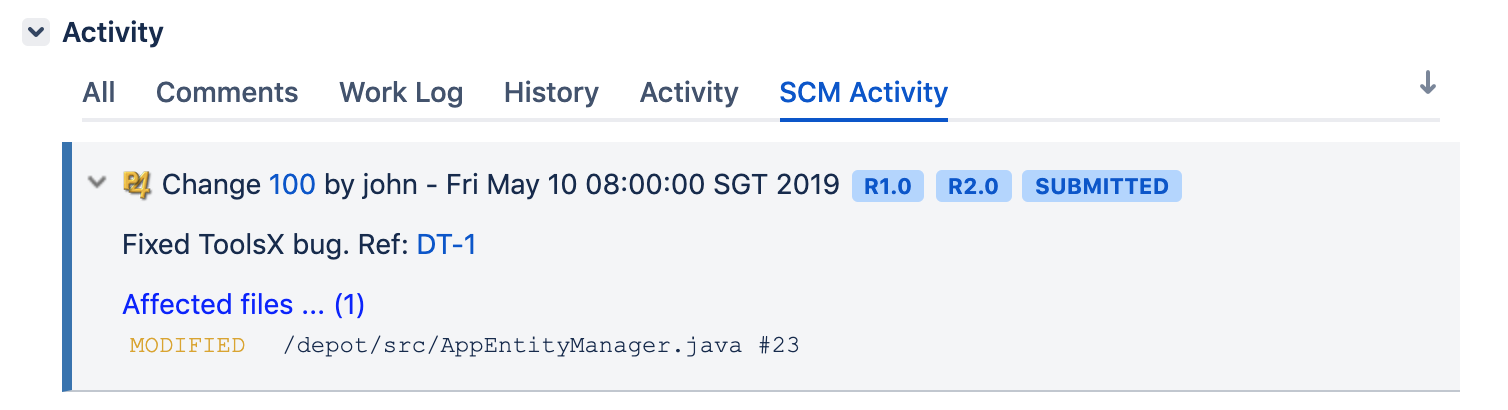
$ curl -u superadmin -H "Content-type: application/json" -XPOST --data '{"issueKey":"DT-1","changeId":"100",\
"changeType":"perforce","changeDate":"2019-05-10 00:00:00","changeStatus":"submitted","changeAuthor":"john",\
"changeLink":"http://perforceweb/c=100","changeMessage":"Fixed ToolsX bug. Ref: DT-1","changeFiles":\
[{"fileName":"/depot/src/AppEntityManager.java","fileAction":"Modified","fileVersion":"23"}],\
"changeTag":"R1.0,R2.0"}' http://localhost:8080/rest/scmchangeset/1.0/changeset/activity
Enter host password for user 'superadmin':
{"id":4,"message":"[Info] DT-1 > 100 activity row [4] is added."}
DEMO
Result:
DEBUG
Go to logging and profiling > Default loggers > Click Configure
Add below:
Package name: com.tse.jira.scmactivitylite.plugin
Logging Level: DEBUG
, multiple selections available,
Related content
Scm Activity For Jira
Scm Activity For Jira
More like this
Scm Changesets for Jira (Cloud)
Scm Changesets for Jira (Cloud)
More like this
Scm Activity REST API Interface or CLI
Scm Activity REST API Interface or CLI
More like this
Scm Change-sets Python Hooks or Scripts
Scm Change-sets Python Hooks or Scripts
More like this
SCM Activity REST API Interface or CLI
SCM Activity REST API Interface or CLI
More like this
Scm Activity SQL Commands or CLI
Scm Activity SQL Commands or CLI
More like this